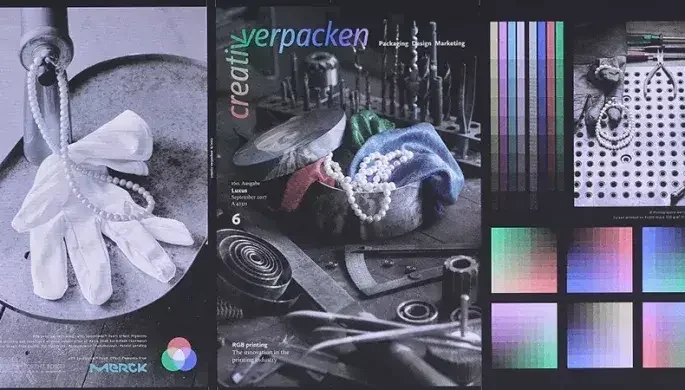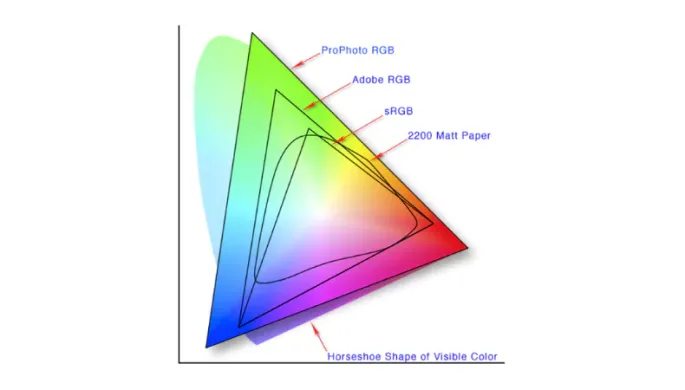
An ICC-managed RGB workflow offers a wider colour gamut and better fidelity during editing. By delaying CMYK conversion until the final output, you ensure predictable results across various devices and simplify multi-platform workflows. While CMYK remains safer for traditional offset printing, RGB provides a more vibrant, future-proof production approach.
It may be an idea to read the previous article on ‘RGB profiles’ in relation to the below.
An ICC‑managed RGB workflow can offer several practical advantages over a straight CMYK workflow, especially in modern digital and mixed print/digital production environments.
1. Wider colour gamut
RGB colour spaces (like sRGB, Adobe RGB, ProPhoto RGB, or ECIRGB) can represent a significantly broader range of colours than typical CMYK inks, especially bright blues, greens, and saturated colour. Working in RGB with an ICC profile preserves this wider gamut during editing, so colours don’t get clipped or shifted early in the workflow.
This is particularly useful when outputting to modern digital wide format printers that use more than just CMYK inks (e.g. light cyan, light magenta, orange, green, etc.), since their RGB interpretation can exploit the full, extended gamut available from those inks.
Also, the production digital inkjet CMYK printers often have wider gamut (range of colours) than the standard offset litho.
2. Better colour fidelity in editing
Because RGB has a larger gamut, it’s generally better to perform colour adjustments (curves, levels, saturation, etc.) in RGB while colour is still “live” with ICC profiles attached. Converting to CMYK too early can cause posterisation, banding, and unexpected hue shifts, especially in gradients and heavily edited images.
By keeping files in RGB until the final output stage, the original colour data stays cleaner through retouching, compositing, and layer effects (including transparency and blending modes).
3. More predictable CMYK conversion
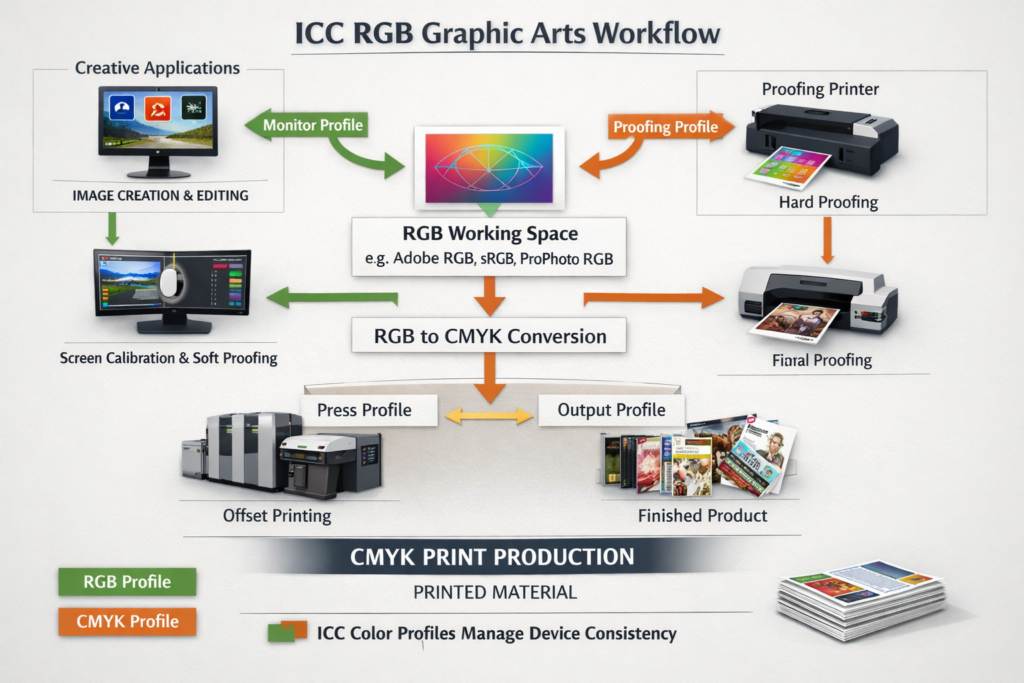
In a proper ICC‑managed workflow, the job is converted from RGB to CMYK only at the very end, using the printer’s own calibrated ICC profile (often via the RIP). This means the same RGB file can be mapped optimally to different presses, papers, and ink sets without needing separate CMYK versions for each.
The RIP can then make smarter, device‑specific adjustments (like gamut mapping, ink limits, and dot gain compensation) that are hard to replicate perfectly in a pre‑converted CMYK file.
However, if you wish to print to a standardised CMYK profile, is often best to convert an CMYK using Adobe InDesign, PDF output, or similar apps.
4. Simpler multi‑output workflows
For jobs that go both to print and to screen (web, apps, social, etc.), an RGB workflow is more efficient: one master RGB file with an appropriate ICC profile can be used for all outputs, with colour management handling the conversion to CMYK for print and to sRGB/Display P3 for screens.
This avoids the need to maintain separate RGB and CMYK versions of every asset, simplifying file management and reducing the risk of version mismatches.
5. Compatibility with modern digital printing
Many modern digital printers and large‑format devices prefer or expect RGB input, relying on their RIP to convert to the device’s internal CMYK model using the correct ICC profile. Sending RGB files to these printers can produces better and more consistent results than forcing them to accept a client‑generated CMYK file that may not match the press characteristics. It pays to know the printer in this case.
Some printers even report that RGB submissions lead to more vibrant output and fewer colour correction issues, because the RIP handles the conversion at the last possible stage with full device knowledge.
While this may be a ‘better’ match because all printer gamut’s are not the same, there will be a different printed result from each printing device.
When CMYK might still be better
A CMYK workflow is simpler and safer when:
- The final output is needed to match conventional offset printing with a known CMYK target (e.g. ISO Coated v2, GRACoL, FOGRA).
- Very tight black text and spot‑colour requirements are critical, to avoid unexpected CMYK “rich black” mixes.
- The designer or print operator has limited colour management expertise and wants to see exactly how colours will look on press early in the process.
In those cases, a CMYK workflow can be easier to control and troubleshoot, especially if the printer expects CMYK files and doesn’t have a strong ICC‑managed managed workflow.
Practical takeaway
For best results in a mixed workflow:
- Work in a wide‑gamut RGB space (e.g. Adobe RGB, ECIRGB) with a proper ICC profile embedded.
- Use soft‑proofing (e.g. in Adobe apps) to preview how colours will look when converted to the target CMYK profile.
- Deliver RGB files to the printer only if they explicitly support ICC‑managed RGB input; otherwise, convert to the correct CMYK profile at the end.
- The key is proper colour management—knowing which RGB space your using, using calibrated monitors, applying the right ICC profiles, and letting the RIP or an app like Adobe InDesign, handle the late binding, final conversion. Without that, RGB can be a recipe for mismatches. But with that in place, RGB isn’t just an option; it’s often the smarter, more future‑proof way to work.