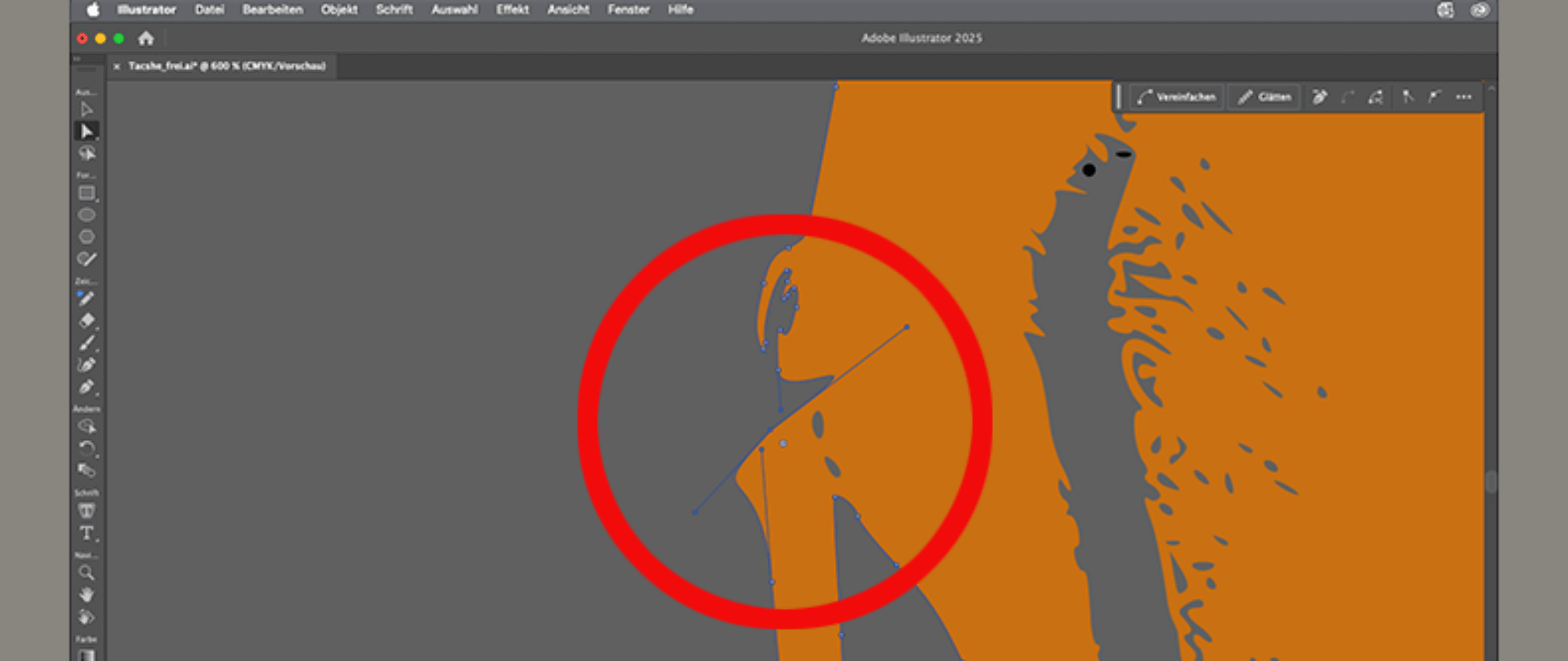
Whether laser-cutting packaging materials, engraving advertising signs, or milling displays—the quality of the vector data plays a decisive role in the efficiency and precision of the manufacturing process. This article shows beginners how to create optimal vector data and avoid common sources of error.
Fundamentals of Vector Data Creation
Vector data is based on mathematical descriptions of geometric shapes using points, lines, and curves. Unlike pixel-based raster graphics, vector data can be scaled without loss of quality. It therefore provides the precision required for many industrial manufacturing processes. They are based on Bézier curves, which are defined by control points and tangent vectors.
Various software solutions have become established for professional vector data creation. Adobe Illustrator is widely used in agencies and the creative industry. In many cases, manufacturers of cutting plotters and engraving machines—such as Roland DG and Mimaki—offer Illustrator plug-ins optimized for their products .
Many sign and display companies use CorelDraw. In recent years, many companies have also switched to the Serif Affinity suite. There are also online solutions for converting simple raster graphics to vector-based formats, such as Convertio.
ArtCam, which is no longer available, is still occasionally used to create vector files for engraving, metal cutting, and wood milling. Carveco offers similar functionality and is aimed primarily at experienced hobbyists, part-time users, and those new to the business.
If the vector data is intended for CNC milling machines or similar equipment, Vectric’s Aspire is often used. Autodesk also offers software suitable for use in the signage industry, such as Autodesk Fusion and AutoCAD. Professional software for creating vector data is typically offered on a subscription basis. Depending on the scope of use, annual fees can range from several hundred to several thousand euros. For this reason, some companies also use open-source solutions such as Inkscape to create vector data.
File Formats and Standards for Vector Data
Typical file formats for vector data in the advertising industry are SVG (Scalable Vector Graphics), EPS (Encapsulated PostScript), and DXF (Drawing Exchange Format).
Laser processing often requires manufacturer-specific formats such as PLT or HPGL. However, modern laser systems are increasingly supporting direct SVG or PDF processing, which significantly simplifies the workflow.

Online conversion of raster graphics to vector data in Convertio (screenshot).
Use of Vector Data
In laser cutting, vector data is converted directly into machine commands. The path direction determines the direction of movement of the laser head, while line attributes such as line width can control the cutting depth or laser power.
In CNC milling, vector data is converted into toolpaths. Additional parameters such as tool diameter, feed rate, and cutting depth must be taken into account.
Cutting plotters follow vector paths directly. Path optimization is particularly important here to minimize unnecessary empty runs and reduce cutting time.
Common Mistakes with Vector Data—and How to Avoid Them
Geometry Problems
Open paths are one of the most common sources of errors. Contours that appear to be closed often have tiny, hard-to-detect gaps. Overlapping paths, on the other hand, can lead to duplicate cuts. Both of these issues usually result in the workpiece becoming unusable.
While modern software for data preparation and machine control—such as Kongsberg iPC or Zünd Cut Center —generally offers the ability to automatically optimize paths, paths should still be created cleanly and closed from the outset whenever possible. It is also recommended to check them at high magnification.
Scaling error
Inconsistent units of measurement are a common source of errors in vector data. They often occur in templates downloaded from the Internet. This is because the Anglo-American system of units is frequently used there, while most of the world has adopted the metric system.
Resolution Issues
The automatic vectorization of pixel images often results in very complex path systems with thousands of anchor points. This can cause processing to take a very long time or to fail. It’s also possible that the cutting, engraving, or milling head will frequently stall, making the result appear “jerky.”
That is why vectorized data should be carefully checked and, if necessary, manually refined. While design software such as Corel Draw or Adobe Illustrator offers the ability to automatically simplify paths, this is often not sufficient for fast and reliable cutting, plotting, milling, or engraving.
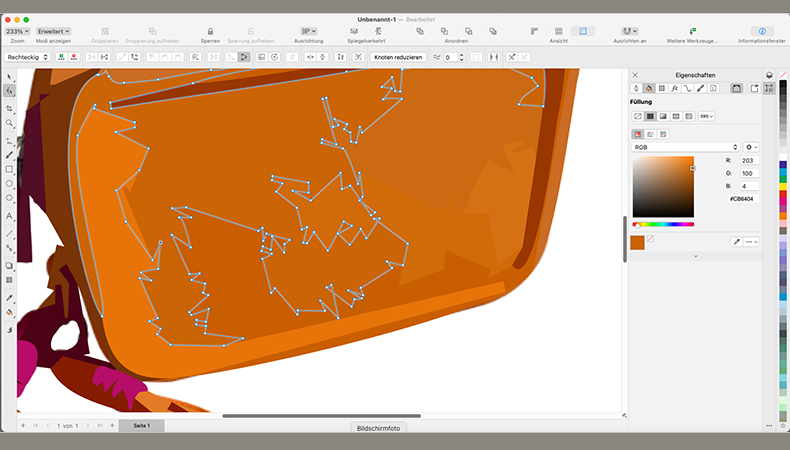
Vectorizing a Bitmap in Corel Draw (Screenshot).
Best Practices for Optimal Vector Data
Use all program options
Systematically optimizing the path sequence significantly reduces production times. The best solutions can be calculated using algorithms, so the control software typically offers corresponding options.
Automating Recurring Tasks
Macros and scripts can automate repetitive editing steps. Adobe Illustrator offers extensive scripting capabilities in JavaScript, while CorelDRAW provides VBA support. For regular, similar projects, it may therefore be worthwhile to invest in relevant training.
Template-Based Workflows
Developing standardized templates for common applications significantly speeds up project creation. Templates should include optimized color palettes for different editing styles, predefined layer structures, and customized export settings.
Quality Control
Systematic quality checks before manufacturing help prevent costly rework. Automated checks can identify open paths, overlapping geometries, or paths that are too complex. Visual inspections at high magnification reveal details that would be overlooked at normal viewing levels.
Today, quality control is often still performed manually by experienced employees. However, AI-based optimization algorithms are expected to soon be able to take over this complex and time-consuming task for standard orders.
Cloud-based workflows also enable the seamless integration of various software tools and facilitate collaboration across different locations. The standardization of exchange formats will further drive this development.
Conclusion
Mastering efficient vector data creation is a key competitive advantage in modern advertising technology. Investments in training, software, and optimized workflows pay off immediately through shorter production times and improved quality.